IBM Vault has long been a powerful solution for secrets management, key lifecycle management, identity brokering, and data protection. However, many organizations have faced a steep learning curve, requiring users to piece together knowledge from scattered developer docs, videos, and community content. With the release of IBM Vault 2.0, the focus has shifted to making the product more intuitive and accessible—reducing the need for deep Vault expertise. This latest version introduces a host of UI enhancements and improved reporting features that help organizations onboard faster, adopt best practices, and gain greater visibility into usage patterns.
A Focus on User-Friendly Onboarding and Adoption
The design philosophy behind IBM Vault 2.0 centers on two key questions: how can we help users easily discover and understand new features, and how can we match features to real-world problems without requiring extensive documentation reading? Additionally, the goal is to enable customers to quickly implement best practices, strengthening their ability to deliver on their own roadmaps.
Addressing the Learning Curve
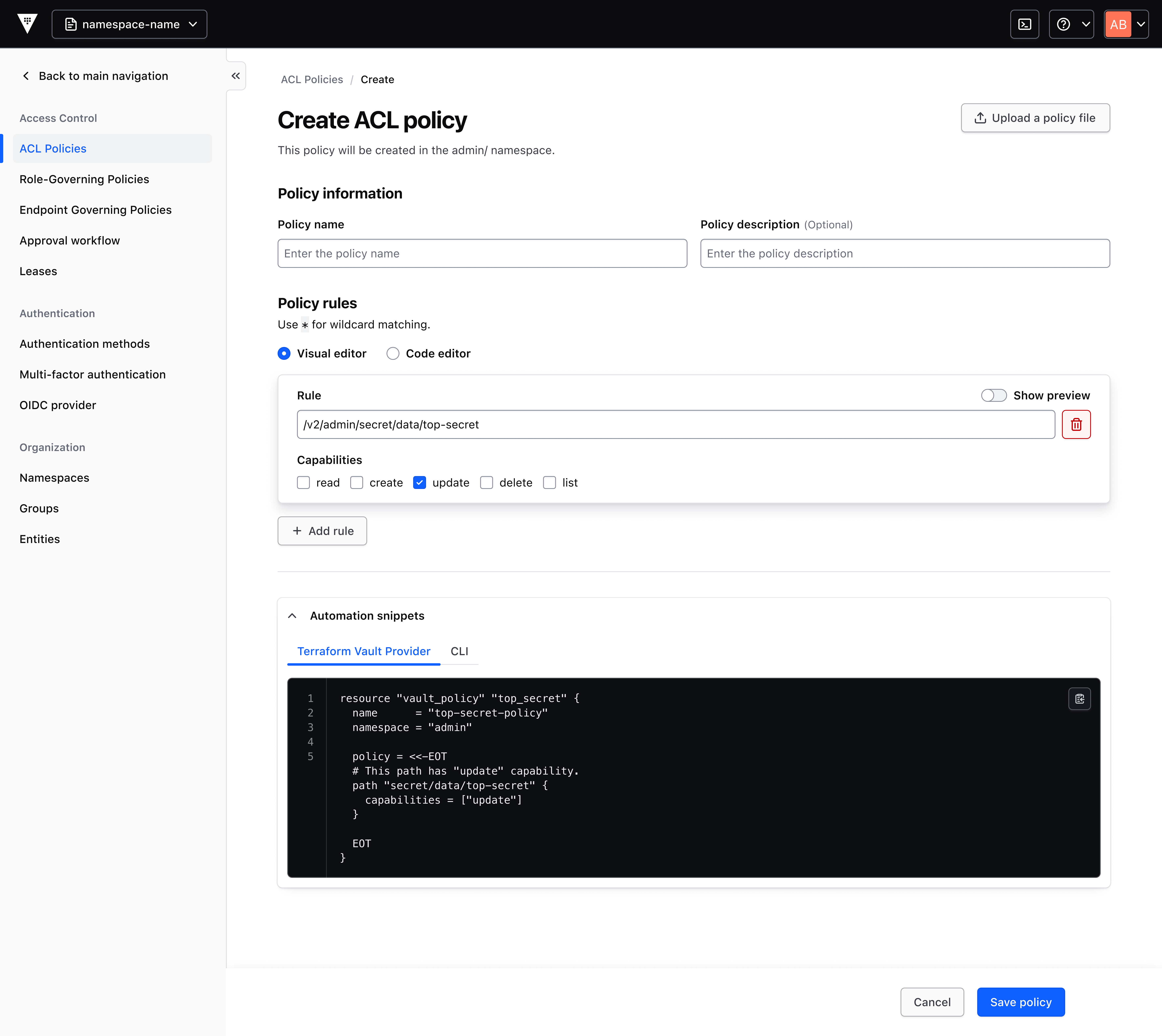
Previously, new Vault users started with no permissions by default. Assigning permissions to use any feature or interact with any resource required writing custom policy code—a barrier that often stalled adoption. Vault 2.0 tackles this head-on by providing context-aware tools that generate pre-filled, best-practice policies from simple forms, eliminating the need for manual coding.
Enhancing Feature Discovery
Rather than expecting users to be experts in Vault documentation, the new UI groups features by customer problems. This problem-centric navigation helps users intuitively find the right tools for their tasks, making the product more approachable for beginners while still powerful for advanced users.
Key UI Enhancements in IBM Vault 2.0
Several new features and improvements have been introduced to support rapid onboarding and smoother day-to-day operations. Each is designed to reduce friction and promote best practices.
Visual Policy Generator
The visual policy generator is a standout feature. It provides a pre-filled, contextual UI form that guides users through creating policy snippets. These snippets can be copied for use with the Terraform Vault Provider (recommended) or saved directly to the Vault cluster. This tool drastically reduces the operational burden on administrators and lowers the barrier for feature adoption, especially for teams new to secrets management.
Onboarding Wizard
When users first encounter a feature, the onboarding wizard asks simple questions about how they intend to use it. Based on the answers, it generates an editable code snippet that supports that specific use case. This approach turns generic documentation into personalized guidance, accelerating the learning process and encouraging best-practice implementation.
Introductory Pages for New and Existing Features
Each feature, whether new or existing, now includes an introductory page that explains its value proposition and offers a recommended quick-start action. These pages provide helpful contextual information, helping users understand not just how to use a feature, but why they should use it—and what problem it solves.
Navigation Bar Revamp
The navigation bar has been completely reorganized. Instead of being arranged by technical categories, the menu now groups features by customer problems (e.g., secrets management, identity brokering). This centers the user experience and makes it easier to discover the right capabilities at the right time, directly aligning with how teams think about their workflows.
Improved Reporting and Consumption Visibility
Beyond UI changes, IBM Vault 2.0.1 brings enhanced reporting and visibility into consumption. Organizations can now see how Vault is being used across different domains—secrets management, key lifecycle, identity brokering, and data protection. This transparency enables teams to track usage patterns, forecast needs, plan capacity, and support governance initiatives. With detailed consumption data, administrators can make informed decisions about scaling, cost allocation, and compliance audits.
How These Enhancements Benefit Organizations
The combined effect of these improvements is a faster, smoother onboarding experience. New users can get started without needing a “PhD in Vault,” while existing users can adopt advanced features more quickly. The visual policy generator and onboarding wizard reduce manual errors and promote consistency, leading to more secure configurations. Better reporting also helps align Vault usage with organizational security policies and business objectives.
Ultimately, IBM Vault 2.0 transforms from a powerful but complex tool into an accessible, user-centric platform. Teams can spend less time figuring out the product and more time using it to protect their digital assets.